Distribute Application Frontend
Context and Motivation
An application accepts input from human users, and displays processing results to them. The user interface might be organized into multiple dialogs (aka editors/forms and views or pages).
As an application architect, I want to distribute logical presentation layer responsibilities (e.g., input consumption and validation, output display, dialog control) to physical tiers in such a way that design-time and runtime properties are balanced and able to meet the project goals, quality requirements, and constraints.
Stakeholder Concerns
- #discoverability
- Search Engine Optimization (SEO) can have a significant impact on business success. Distributing rendering strategies to dedicated tiers influences the way information can be indexed by web crawlers. The chosen presentation strategy should address and reflect SEO requirements early in the design.
- #evolvability
- User interfaces must remain adaptable as technologies, platforms, and user needs evolve. Supporting different platforms or updating frameworks should not require full system changes.
- #runtime-QoS
- The distribution of presentation logic (i.e., forms and views, dialog control) across physical tiers affects runtime Quality-of-Service (QoS) attributes such as performance, scalability, and reliability. For example, moving certain functions to the client side can reduce server load but might impact client performance or network utilization.
- #security
- Remote placement of presentation layer responsibilities exposes more code to external parties. The data accepted from and displayed to end users as such does not change, but is transported and treated differently. Authentication, authorization, and data validation concerns become more complex when the frontend is distributed.
- #team-organization
- Cases in which there is a dedicated team (silo) of designers (such as Web designers or user interface designers) have to be taken into account; while the notion of a “full stack developer” exists that covers frontend and backend development, specializations can also be observed. The specialized teams should communicate well and collaborate intensively (but cannot be assumed to always do). Conway’s Law applies, stating that organizations which design systems produce designs that are copies of the communication structures of these organizations [Conway 1968; Vernon and Jaskula 2022]; an adequate organizational fit is a critical success factor. The Team Topologies community and book [Skelton, Pais, and Malan 2019] elaborate and suggest suited organization structures. An “inverse Conway maneuver” has been proposed by M. Fowler [2022] but also criticized by Dupuydauby [2023].
- #testability
- UI testing includes both logic verification and visual validation. Architectures that combine frontend with backend in one tier make automation harder and increase effort for consistent, isolated UI tests.
- #user-experience
- The easier it is to navigate, provide input, and view output, the better. There may not be a one-size-fits-all user interface for all stakeholders. Supporting different User Interface (UI) paradigms (e.g. desktop, web, mobile) might be necessary. Certain user interface designs might require special hardware.
Initial Position Sketch
This refactoring targets the logical presentation layer [Martin Fowler 2002] of an application. This presentation layer is responsible for controlling dialog between end users and the systems, displaying processing results and accepting user input (and validating it). The business logic in the next layer performs computations, manipulates business objects, and maintains application state. The persistence layer stores business objects and all other long-lasting application state; it also offers data retrieval and update operations (data access).
Figure 1 illustrates a logically layered monolith. There is a single tier only; the entire user interface is part of it. Hence, desktop applications such as word processors or spreadsheet software and standalone IDEs not connecting to cloud services qualify as known uses; Web applications that serve an end user via a browser or a smartphone that communicate with a remote backend do not. Note that the term “monolith” sometimes also is used to describe a backend that is not split into separate processes or other forms of application components that can be distributed; this double use of the term can be attributed to the omnipresence of Web applications of all kinds today.
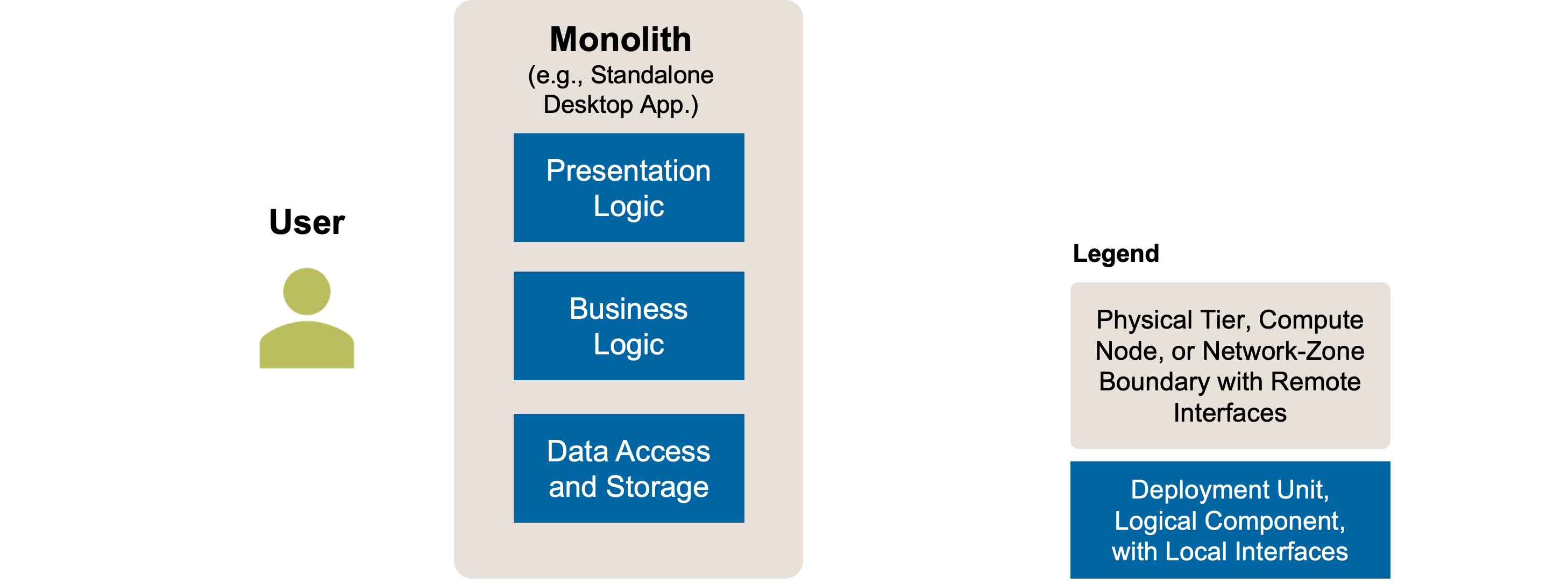
Figure 1: Distribute Application Frontend: Initial Position Sketch. A logically layered monolithic application.
Smells
The fully monolithic initial position, but also the desired target solutions (distribution patterns) may suffer from certain problems regarding their desired qualities (articulated as concerns earlier on):
- Bad user experience
- Some server-rendered UIs (called “Distributed Presentation” in the client-server cut terminology from Renzel and Keller [1997]) come across as outdated or inflexible; they were particularly popular in the early 2000s [Martin Fowler 2002]. Users expect interactive interfaces with real-time feedback, intuitive navigation, and offline capability today. Full-page reloads or delayed updates lower the flow of interaction and reduce user satisfaction.
- Installation effort and incompatibilities
- In monolithic architectures, chan-ges in lower logical layers (e.g., backend APIs or data models) may require updates to the higher layers. Tightly coupled deployments increase the frequency of breaking changes, raising installation and configuration effort for users.
- Limited evolvability
- A frontend tightly coupled to server-side technologies (“Distributed Presentation”) limits the ability to adopt new frontend frameworks or develop alternative interfaces (e.g., mobile apps). Backend modifications are often required for UI-level innovation or migration. Large UI migrations often require full rewrites instead of incremental, step-by-step transitions.
- Poor response times
- Server-side rendering (“Distributed Presentation”) often leads to frequent client-server round trips, especially in multistep dialogs. Page transitions may lag due to network delays, and round trips put additional load on the backend. On the other hand, client-side rendering can result in unnecessary re-rendering or flickering. Such performance issues negatively affect user experience and system efficiency.
- Poor visibility
- Client-side rendering (called “Remote User Interface” in the client-server cut terminology from Renzel and Keller [1997]) without appropriate fallbacks can hinder site/page indexing by search engines. Pages may appear blank or incomplete to crawlers, reducing discoverability and affecting business outcomes that depend on search engine rankings.
- Reduced testability
- Testing requires full system deployment when monolithic cross-layer dependencies exist. Presentation logic that is not physically separated from the business logic cannot be verified in isolation, slowing down test cycles and complicating test automation setups.
Instructions
There are several options, depending on the as-is situation:
- A. Refactor from monolith (no separate frontend) to distributed presentation. Extract User Interface (UI) to a thin server-rendered web tier.
- B. Refactor from monolith (no separate frontend) to remote UI. Extract UI to a rich client-rendered frontend, either a Single-Page Application (SPA) or a native app (on desktop PC or mobile phone).
- C. Switch from distributed presentation to remote UI. Migrate server-rendered frontend to SPA for better user experience and decoupled evolution.
- D. Switch from remote UI to distributed presentation. Reintroduce server rendering for simplicity, performance, caching, pre rendering, maintainability or SEO needs.
- E. Return to monolith and remove separate application frontend. Move user interface back into the monolith, for simpler deployment in internal apps.
Figure 2 visualizes these transition options in a state diagram.
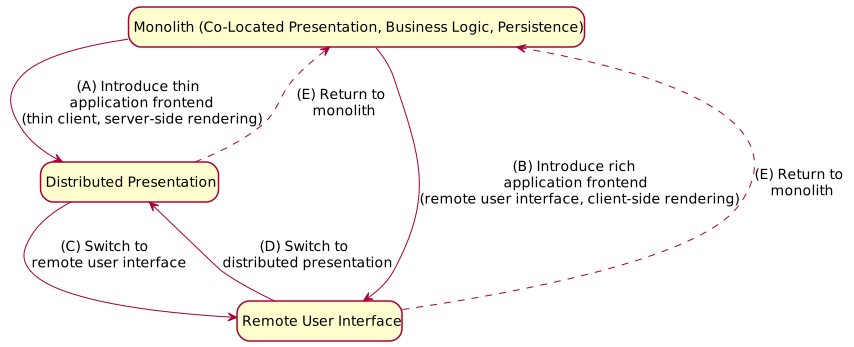
Figure 2: Distribute Application Frontend: Refactoring Options
Note that Option E actually is not a full refactoring on its own, but merely undoes other options. Cloud-native applications by definition have a separate Web application frontend that forms its own tier; Options A, B and E are not available in that setting as a true/full monolith is not possible.
The five options above focus on distributing presentation logic across physical tiers. Note that we define tier as a collection of co-located compute nodes here (which is in line with the Renzel/Keller paper [Renzel and Keller 1997]). Remote communication is required to integrate API clients and providers on different tiers; within a compute note, inter-process or intra-process communication is sufficient. Modularizing a remote user interface restructures a large frontend into independently evolvable vertical slices (aka microfrontends), enabling domain ownership and incremental modernization.
Target Solution Sketch (Evolution Outline)
The frontend can either be separated from the backend partially, with the dialog control remaining on the server-side (Option A) or with the dialog control also moved (Option B). In Option B, a remote API (typically a Web API) connects frontend (presentation layer) and backend (business logic and persistence). Figure 3 sketches Option A; Option B is sketched in Figure 4. Switching from either target to the other (Options C and D) is shown in Figure 5.
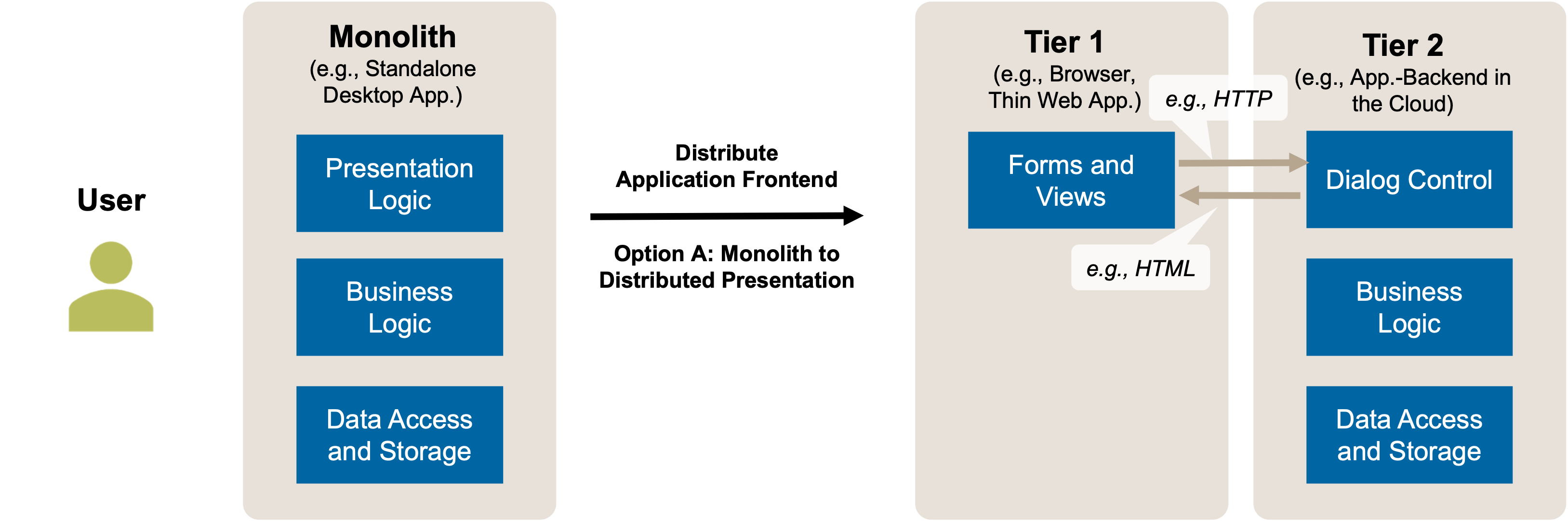
Figure 3: Distribute Application Frontend: Target Solution Sketch. From Local User Interface (Monolith) to Distributed Presentation (Option A).
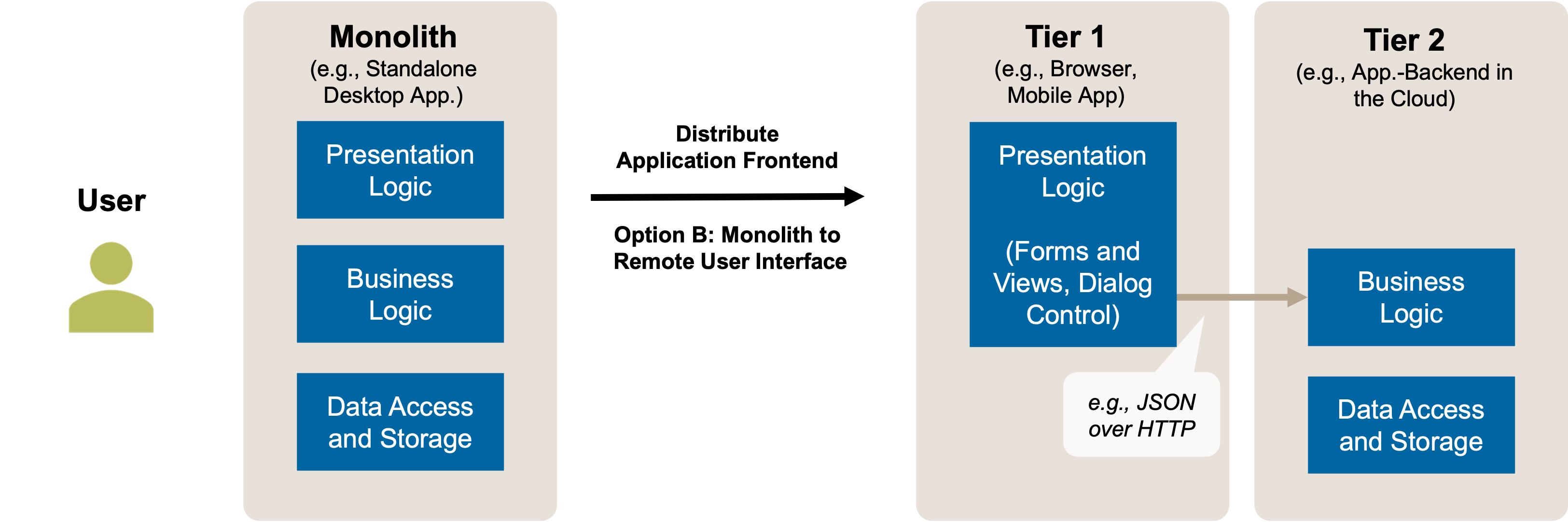
Figure 4: Distribute Application Frontend: Target Solution Sketch. From Local User Interface (Monolith) to Remote User Interface (Option B).
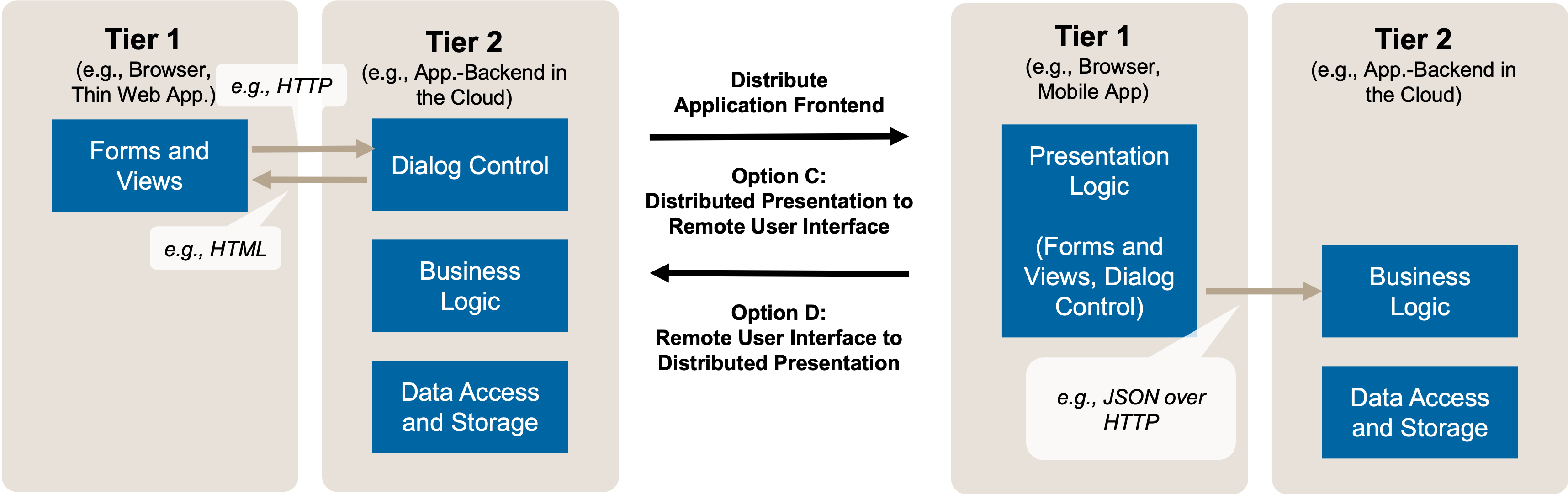
Figure 5: Distribute Application Frontend: Target Solution Sketch. From Distributed Presentation to Remote User Interface and back (Options C and D).
These options can be combined with other client-server cuts, including distributed application kernel, remote database, and distributed database [Renzel and Keller 1997].
Example(s)
Examples for the target solutions of the first four options presented above are:
- Distributed Presentation (Options A and D): Spring Pet Clinic uses server-rendered Thymeleaf templates following a Template View pattern from “Patterns of Enterprise Application Architecture” [Martin Fowler 2002]. The backend is responsible for HTML generation and dialog navigation.
- Remote User Interface (Options B and C): SPAs built with React, Angular, or Vue usually consume backend APIs via REST or GraphQL. The frontend owns routing and local state.
Large-scale platforms use microfrontends to let teams build and deploy UI parts independently, even with different frameworks and release cycles. They are integrated into a platform by a shell application.
Hints and Pitfalls to Avoid
Frontend engineering is a sub-discipline of computer science and software engineering with its own principles, tools, and communities. When designing client-server architectures that involve frontend distribution, consider the following guidelines:
- Balance trade-offs using requirements: Let non-functional goals such as performance, scalability, security, and usability guide where to split front-end and back-end. Server rendering may reduce latency and simplify optimization, while client-heavy apps enable interactivity and offline use. Prioritize requirements over trends when making architecture decisions.
- Don’t violate logical layering: Avoid bypassing intended separation of concerns. In server-rendered apps, don’t embed SQL in templates. In client-heavy apps, avoid direct database access. Always go through backend APIs to maintain modularity and prevent tight coupling.
- Do not implement complex business logic in a frontend following the remote user interface client/server cut; place this logic in a separate logical layer in the backend. Introduce suited frontend-backend integration APIs.
- Avoid hybrid rendering unless necessary: Mixing server-side rendering with SPAs increases complexity and reduces consistency. Only use hybrid strategies if clearly justified, and document which parts follow which model to simplify onboarding and maintenance.
- Separate the interface to the business logic from any server-side presentation logic (like HTML templating) carefully.
- Be mindful of microfrontend complexity. Like microservices in the backend microfrontends add modularity, but also bring coordination challenges. Watch for duplicate dependencies, fragmented UX, and complex deployments. Favor well-defined contracts, consistent design tokens, and automated integration to maintain modularity without sacrificing cohesion.
- Make sure that general concerns such as security and testability are met; detail suggestions how to achieve that can be found in the literature [Hoffman 2024].
Related Content
Other architectural refactorings in this catalog include Segregate Commands from Queries, Split Application Backend Logic, and Split Application Backend Persistence.
The paper “Client/Server Architectures for Business Information Systems – A Pattern Language” [Renzel and Keller 1997] features five client-server cuts (aka distribution patterns) including Remote User Interface and Distributed Presentation.
The Microfrontend Architecture extends the Remote User Interface and Distributed Presentation patterns by decomposing the frontend into independently developed and deployed fragments. This enables domain-aligned team ownership, incremental technology migration, and independently evolving UI modules. While microfrontends operate within a single client tier, they share key architectural goals with Split Application Backend Logic on the backend. As with the backend, Domain-Driven Design (DDD) principles can be applied to structure microfrontends, aligning each independently evolving fragment with a Bounded Context.
Modern frontend architectures often rely on a mix of rendering strategies such as Server-Side Rendering (SSR), Client-Side Rendering (CSR), Static Site Generation (SSG), Incremental Static Generation (ISG) or Edge Side Rendering (ESR). These techniques balance trade-offs between interactivity, performance, and SEO. Frameworks like Next.js, Nuxt, Astro and qwik support hybrid approaches combining SSR with static pre-rendering and hydration or resumability. See micro-frontends.org, nextjs or vercel.com for architectural implications of rendering strategy choices.
References
Conway, Melvin E. 1968. “How Do Committees Invent?” Datamation. http://www.melconway.com/research/committees.html.
Dupuydauby, C. 2023. “ICM #1: Say No to the ’Inverse Conway Maneuver’.” A Medium Corporation. https://medium.com/@Cyrdup/icm-1-say-no-to-the-inverse-conway-maneuver-6672ba2373cb.
Fowler, M. 2022. “Conway’s Law.” https://martinfowler.com/bliki/ConwaysLaw.html.
Fowler, Martin. 2002. Patterns of Enterprise Application Architecture. Boston, MA, USA: Addison-Wesley Longman Publishing Co., Inc.
Hoffman, A. 2024. Web Application Security: Exploitation and Countermeasures for Modern Web Applications. O’Reilly Media.
Renzel, Klaus, and Wolfgang Keller. 1997. “Client/Server Architectures for Business Information Systems – a Pattern Language.” In Proceedings of the Conference on Pattern Languages of Programs. PLoP ’97.
Skelton, M., M. Pais, and R. Malan. 2019. Team Topologies: Organizing Business and Technology Teams for Fast Flow. IT Revolution.
Vernon, Vaughn, and Tomasz Jaskula. 2022. Strategic Monoliths and Microservices: Driving Innovation Using Purposeful Architecture. Addison-Wesley Signature Series (Vernon). Addison-Wesley Professional.